
Revised article
Modern dependency management

One of the greatest tool available on GitHub is Dependabot. For those not familiar with it, in short it's a bot reviewing your list of dependencies and proposing PRs to update them.
If you are not using GitHub there are alternatives including the open source version of Dependabot (https://github.com/dependabot) or also Renovate: https://www.mend.io/renovate/
But in this article I will not go through the configuration of any of them. I wanted to share my experience. I have been using Dependabot for a couple of years now and I think the following advice should apply to any equivalent alternatives.
-
Never merge any Dependabot’s PRs right away!
-
It’s tempting but we should check a few things before.
-
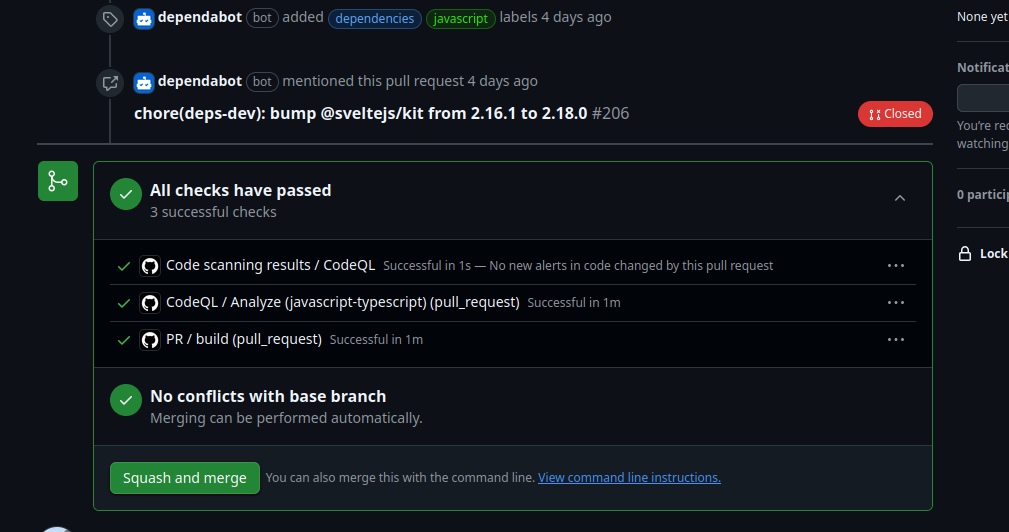
First of all you need a CI workflow that will run on every PR push. And you should check whether it did run successfully or not.
-
That workflow I suggest to be at least checking formatting, linting, and confirm build/compiling still works. Ideally we have tests too.
- You can find an example for a Svelte front-end here: https://github.com/SonnyAD/utile-front/blob/main/.github/workflows/pr.yml
-
In the case the PR did not pass, pretty often (from my experience) it's a minor thing to fix/migrate. Generally you can see from the lint or build errors what is not compiling anymore. So checkout the branch of the PR locally do the fix yourself in the branch and commit/push, once the PR workflow passes then you can consider merging it.
-
In the rare case where things need a huge migration, I suggest considering to delay that migration until you have proper time and focus for it. Or you can just decide to stick to the current version. For the latter, you can add something like below in the
dependabot.yaml. The example makes Dependabot stick with any 20.x.y version for@types/node:
    ignore:
      - dependency-name: '@types/node'
        versions:
          - '>=21.0.0'
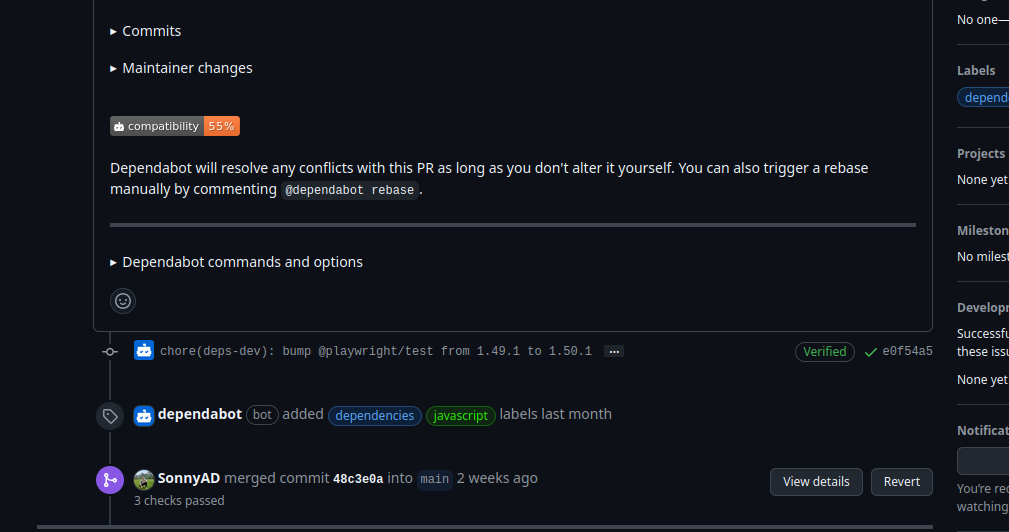
- After merging, in some cases, especially if you don't have much test coverage, an update can bring an unwanted behavior that you notice later. At that moment, don't hesitate to come back to the merged PR, and click on the Revert button in it and merge right away the reverting changes (careful: a revert brings back the code, not your data)
Two examples from experience
-
Dependabot once proposed a patch update (0.0.Z) of a somewhat obscure calendar dependency. It completely broke the appointment creation. Some dependencies can be quite complex to test, and even an update that looks benign can break your app. So stay on your guard, and don't hesitate to add an
ignoresection in yourdependabot.yml. -
Same with
ignoreif you use a framework like React, NestJS or others. Dependabot sometimes proposes partial updates of the framework's libraries, and you end up with an app half on version X and half on version Y, and then everything breaks. Ideally you have E2E tests to check as much as possible, but sometimes it remains complicated. (Dependabot can also group these updates, so they come together in one PR.)
Match the process to the risk
Not all updates are equal. A security fix should not wait for the weekly review: check if you are affected and fix it quickly. A major version needs its migration guide and real tests. And remember a revert brings back the code, not your data: if an update migrated data, plan how to go back before you merge.
Final pieces of advice
Generally it's better to stay on latest versions of your dependencies. Because they likely have less bugs, are more performant, have up-to-date documentation (not always true), etc. Just read the changelog before a big jump.
But you don't need to rush updates too.
Plan regular time to process the dependabot PRs. And better update dependencies days ahead of releases (if you don’t apply CD and/or don’t have enough tests) because of the unwanted behavior we can notice sometimes later.
Updating dependencies is an ongoing (never-ending) maintenance work. But I believe that if you apply all the advice, it will make your products last longer too.